MVVM with Co-ordinator

MVVM (Model-View-ViewModel)

Purpose: Separate business logic, UI and data to improve testability and structure.

1. Model

  • Represents the data and business logic.
  • Example: Network responses, database entities, business rules.

2. View

  • Represents UI components (like UIViewController).
  • Displays data from the ViewModel.

3. ViewModel

  • Transforms data from the Model to a format the View can use.
  • Contains logic to respond to user input and update the view.
  • Binds to the View using Observables (like RxSwift, Combine or custom bindings).

Coordinator Pattern

Purpose: Decouples navigation logic from view controllers. This helps to:

  • Avoid massive view controllers
  • Improve reusability and testability
  • Centralize and control navigation flow

Coordinator Responsibilities:

  • Handle navigation (push, pop, modal etc.)
  • Own and start view controllers
  • Communicate between modules

SOLID Principle

The SOLID principles are five design principles that help create maintainable, scalable, and testable software.

  1. Single Responsibility Principle
  2. Open/Closed Principle
  3. Liskov Substitution Principle
  4. Interface Segregation Principle
  5. Dependency Inversion Principle

1. Single Responsibility Principle (SRP)

A class should have only one reason to change (i.e only one responsibility).

Example (Violating SRP)

class UserManager {
    func saveUserData() {
        print("Saving user data to database")
    }
    
    func sendEmailVerification() {
        print("Sending verification email")
    }
}

Example (Following SRP)

class UserDataManager {
    func saveUserData() {
        print("Saving user data to database")
    }
}

class EmailService {
    func sendEmailVerification() {
        print("Sending verification email")
    }
}

// Usage
let userManager = UserDataManager()
userManager.saveUserData()

let emailService = EmailService()
emailService.sendEmailVerification()

2.Open/Closed Principle

A class should be open for extension but closed for modification.

Example (Violating OCP)

class Payment {
    func processPayment(type: String) {
        if type == "CreditCard" {
            print("Processing Credit Card payment")
        } else if type == "UPI" {
            print("Processing UPI payment")
        }
    }
}
  • Every time a new payment method is introduced, we need to modify this class.
  • This violates OCP because the class is not closed for modification.

Example (Following OCP)

We refactor the design to follow OCP using protocols and polymorphism.

// Step 1: Create a Payment protocol
protocol Payment {
    func processPayment()
}

// Step 2: Implement different payment methods
class CreditCardPayment: Payment {
    func processPayment() {
        print("Processing Credit Card payment")
    }
}

class UPIPayment: Payment {
    func processPayment() {
        print("Processing UPI payment")
    }
}

class PayPalPayment: Payment {
    func processPayment() {
        print("Processing PayPal payment")
    }
}

// Step 3: Used Dependency Injection in the PaymentProcessor class
class PaymentProcessor {
    func process(payment: Payment) {
        payment.processPayment()
    }
}

// Usage
let paymentProcessor = PaymentProcessor()
let creditCardPayment = CreditCardPayment()
let upiPayment = UPIPayment()
let paypalPayment = PayPalPayment()

paymentProcessor.process(payment: creditCardPayment)  // Output: Processing Credit Card payment
paymentProcessor.process(payment: upiPayment)         // Output: Processing UPI payment
paymentProcessor.process(payment: paypalPayment)      // Output: Processing PayPal payment
  • No need to PaymentProcessor when adding a new payment method.
  • New payment types can be added without changing existing code.
  • The system is open for extension but closed for modification.

3.Liskov Substitution Principle (LSP)

Subclasses should be able to replace their base classes without breaking the application. Objects of a superclass should be replaceable with objects of a subclass without affecting the correctness of the program.

Example (Violating LSP)

class Bird {
    func fly() {
        print("Flying...")
    }
}

class Penguin: Bird {
    override func fly() {
        fatalError("Penguins can't fly!")
    }
}

Example (Following LSP)

protocol Bird {
    func move()
}

class Sparrow: Bird {
    func move() {
        print("Flying...")
    }
}

class Penguin: Bird {
    func move() {
        print("Swimming...")
    }
}

4.Interface Segregation Principle (ISP)

A class should not be forced to implement methods it doesn’t need.

Example (Violating ISP)

protocol Worker {
    func work()
    func eat()
}

class Robot: Worker {
    func work() {
        print("Working...")
    }

    func eat() {
        // not needed 
    }
}

Example (Following ISP)

protocol Workable {
    func work()
}

protocol Eatable {
    func eat()
}

class Human: Workable, Eatable {
    func work() {
        print("Working...")
    }

    func eat() {
        print("Eating...")
    }
}

class Robot: Workable {
    func work() {
        print("Working...")
    }
}

Now, Robot only implements what it needs.

Dependency Inversion Principle (DIP)

High-level modules should not depend on low-level modules; both should depend on abstractions.

Example (Violating DIP)

class LightBulb {
    func turnOn() {
        print("Light is ON")
    }

    func turnOff() {
        print("Light is OFF")
    }
}

class Switch {
    let bulb = LightBulb() // Direct dependency on a concrete class

    func operate() {
        bulb.turnOn()
    }
}

The Switch class depends on LightBulb, making it hard to switch to LED, Smart Bulbs.

Example (Following DIP)

protocol Switchable {
    func turnOn()
    func turnOff()
}

class LightBulb: Switchable {
    func turnOn() {
        print("Light is ON")
    }

    func turnOff() {
        print("Light is OFF")
    }
}

class SmartLight: Switchable {
    func turnOn() {
        print("Smart Light is ON")
    }

    func turnOff() {
        print("Smart Light is OFF")
    }
}

class Switch {
    let device: Switchable

    init(device: Switchable) {
        self.device = device
    }

    func operate() {
        device.turnOn()
    }
}

SRP: Keeps code organized and maintainable.

OCP: Makes it easy to extend functionality.

LSP: Prevents unexpected behavior in subclasses.

ISP: Keeps interfaces clean and specific.

DIP: Makes code loosely coupled and more flexible.

Design Patterns in iOS

Design patterns help in structuring code efficiently and making it reusable, maintainable, and scalable. Here are some commonly used design patterns in Swift with examples:

  1. Creational Patterns → Deal with object creation.
  2. Structural Patterns → Focus on class and object composition.
  3. Behavioural Patterns → Define communication between objects.

1. Creational Design Patterns (Object Creation)

1.1 Singleton Pattern

Ensures only one instance of a class exists.

class DatabaseManager {
    static let shared = DatabaseManager() // Single shared instance
    
    private init() {} // Private constructor prevents multiple instances
    
    func fetchData() {
        print("Fetching data from database")
    }
}

// Usage
DatabaseManager.shared.fetchData()

1.2 Factory Pattern

Creates objects without specifying the exact class.

protocol Notification {
    func send()
}

class EmailNotification: Notification {
    func send() { print("Sending Email") }
}

class SMSNotification: Notification {
    func send() { print("Sending SMS") }
}

class NotificationFactory {
    static func createNotification(type: String) -> Notification? {
        switch type {
        case "Email": return EmailNotification()
        case "SMS": return SMSNotification()
        default: return nil
        }
    }
}

// Usage
let notification = NotificationFactory.createNotification(type: "Email")
notification?.send()  // Output: Sending Email

1.3 Builder Pattern

Creates complex objects step by step.

class User {
    var isLoggedIn: Bool = false
    var isRegistered: Bool = false
}

class UserState {
    private var user = User()
    
    func setUserLoginState() -> UserState {
        user.isLoggedIn = true
        return self
    }
    
    func setUserRegnState() -> UserState {
        user.isRegistered = true
        return self
    }
    
    func build() -> User {
        return user
    }
}

// Usage
let myUser = UserState().setUserLoginState().setUserRegnState().build()
print(myUser.isLoggedIn)  // Output: true

2. Structural Design Patterns (Class & Object Composition)

These patterns define object relationships.

2.1 Adapter Pattern

protocol ButtonProtocol {
    func onClick()
}

class ThirdPartyButton {
    func press() {
        print("Third-party button was pressed")
    }
}

class ButtonAdapter: ButtonProtocol {
    private let thirdPartyButton: ThirdPartyButton
    
    init(thirdPartyButton: ThirdPartyButton) {
        self.thirdPartyButton = thirdPartyButton
    }
    
    func onClick() {
        print("Adapter converting button press...")
        thirdPartyButton.press()  // Adapting the method
    }
}

// Usage
let thirdPartyButton = ThirdPartyButton()
let adaptedButton = ButtonAdapter(thirdPartyButton: thirdPartyButton)

adaptedButton.onClick()


//Output
Adapter converting button press...
Third-party button was pressed

2.2 Decorator Pattern

Adds functionality to an object dynamically.

protocol Coffee {
    func cost() -> Double
}

class BasicCoffee: Coffee {
    func cost() -> Double { return 5.0 }
}

class MilkDecorator: Coffee {
    private let base: Coffee
    
    init(base: Coffee) {
        self.base = base
    }
    
    func cost() -> Double {
        return base.cost() + 2.0
    }
}

// Usage
let coffee = BasicCoffee()
print(coffee.cost())  // Output: 5.0

let milkCoffee = MilkDecorator(base: coffee)
print(milkCoffee.cost())  // Output: 7.0

3. Behavioral Design Patterns (Communication Between Objects)

3.1 Observer Pattern

Allows multiple objects to observe changes in another object.

protocol Observer {
    func update(temperature: Double)
}

class WeatherStation {
    var temperature: Double = 0 {
        didSet {
            notifyObservers()
        }
    }
    
    private var observers: [Observer] = []
    
    func addObserver(_ observer: Observer) {
        observers.append(observer)
    }
    
    private func notifyObservers() {
        observers.forEach { $0.update(temperature: temperature) }
    }
}

class DisplayScreen: Observer {
    func update(temperature: Double) {
        print("Temperature updated: \(temperature)°C")
    }
}

// Usage
let weatherStation = WeatherStation()
let display = DisplayScreen()

weatherStation.addObserver(display)
weatherStation.temperature = 30  

// Output: Temperature updated: 30°C

Dependency Injection in iOS

Dependency Injection (DI) in Swift is a design pattern that allows to inject dependencies into a class instead of letting the class create them itself. This improves testability, modularity and flexibility.

There are three main types of Dependency Injection in Swift:

1. Constructor Injection (Initialiser Injection)

2. Property Injection

3. Method Injection

1. Constructor Injection (Initialiser Injection)

Dependencies are passed via the initialiser.

protocol DataService {
    func fetchData() -> String
}

class APIService: DataService {
    func fetchData() -> String {
        return "Data from API"
    }
}

class DataManager {
    private let service: DataService

    init(service: DataService) { // Injected Dependency via Initialiser
        self.service = service
    }

    func getData() -> String {
        return service.fetchData()
    }
}

let apiService = APIService()
let dataManager = DataManager(service: apiService)
print(dataManager.getData()) // Output: "Data from API"

2. Property Injection

The dependency is injected via a property after the object is initialised.

protocol DataService {
    func fetchData() -> String
}


class DataManager {
    var service: DataService?

    func getData() -> String {
        return service?.fetchData() ?? "No data"
    }
}

let dataManager = DataManager()
dataManager.service = APIService()
print(dataManager.getData()) // Output: "Data from API"

3. Method Injection

Dependencies are passed as parameters to methods instead of being stored in properties.

class DataManager {
    func getData(using service: DataService) -> String {
        return service.fetchData()
    }
}

let dataManager = DataManager()
let apiService = APIService()
print(dataManager.getData(using: apiService)) // Output: "Data from API"

Dependency Inversion Principle(DIP)

This principle helps in achieving loose coupling between components, making the code more maintainable, scalable and testable.

Example Without Dependency Inversion (Tightly Coupled Code)

class APIService {
    func fetchData() -> String {
        return "Data from API"
    }
}

class DataManager {
    private let apiService = APIService() // Tight coupling

    func getData() -> String {
        return apiService.fetchData()
    }
}

Here, the DataManager directly depends on APIService creating a tight coupling

If we want to replace APIService with another data source ( MockService for testing) we need to modify DataManager.

Difficult to test because DataManager is tightly coupled to APIService.

To follow DIP, we introduce an abstraction (protocol) so that DataManager depends on an interface, not a concrete class.

// Abstraction (Protocol)
protocol DataService {
    func fetchData() -> String
}

// Concrete Implementation
class APIService: DataService {
    func fetchData() -> String {
        return "Data from API"
    }
}

// Another Implementation (For Testing or Alternate Source)
class MockService: DataService {
    func fetchData() -> String {
        return "Mock Data"
    }
}

// High-Level Module (Now depends on abstraction)
class DataManager {
    private let service: DataService

    init(service: DataService) {
        self.service = service
    }

    func getData() -> String {
        return service.fetchData()
    }
}

// Usage
let apiService = APIService()
let dataManager = DataManager(service: apiService)
print(dataManager.getData()) // Output: "Data from API"

// For Testing
let mockService = MockService()
let testDataManager = DataManager(service: mockService)
print(testDataManager.getData()) // Output: "Mock Data"

Architecture Patterns in iOS

1. MVC (Model-View-Controller)

MVC is the default architecture pattern where

  • Model: Handles data and business logic.
  • View: Displays UI components.
  • Controller: Acts as an intermediary between Model and View.

2. MVVM (Model-View-ViewModel)

  • Model: Represents the Data or Entity
  • View: UI elements (UIView, UIViewController).
  • ViewModel: Acts as a bridge between the Model and View by processing data and handling logic.

MVVM with Dependency Inversion (DI)

Difference Between MVVM and MVC

MVVM (Model-View-ViewModel) and MVC (Model-View-Controller) are two popular architectural patterns used in iOS app development, particularly when working with Swift. Each pattern has its own set of principles and differences. I have highlight the key differences between MVVM and MVC in the context of Swift development:

  • Separation of Concerns:
    • MVC: In MVC, the controller is responsible for both user interface (View) interaction and data management (Model). This can lead to massive view controllers and difficulties in code organization.
    • MVVM: MVVM separates concerns more cleanly. The ViewModel takes charge of data management and transformation, while the View remains responsible for rendering the user interface. This leads to smaller and more maintainable view controllers.
  • Data Binding:
    • MVC: In MVC, updating the View with changes in the Model typically requires manual synchronization. The controller is responsible for fetching data from the Model and updating the View accordingly.
    • MVVM: MVVM encourages two-way data binding between the ViewModel and the View. When data in the ViewModel changes, the View is automatically updated, and user interactions are directly handled by the ViewModel.
  • Testing:
    • MVC: Testing can be challenging in MVC because the controller often tightly couples the View and Model. It’s difficult to isolate components for unit testing.
    • MVVM: MVVM promotes easier testing. Since the ViewModel is independent of the View, it can be unit-tested more effectively. We can also use mock ViewModel instances to simulate different scenarios and test the View separately.
  • Code Reusability:
    • MVC: Reusing View components can be challenging because they are often tightly coupled with the controller.
    • MVVM: MVVM allows for better code reusability since the ViewModel, which contains most of the business logic, can be shared between different views or even across different platforms if implemented correctly.
  • View Controller Size:
    • MVC: MVC often results in large and complex view controllers, as they handle both the user interface and data management.
    • MVVM: MVVM helps keep view controllers smaller and more focused on user interface logic. Business logic is encapsulated in the ViewModel.
  • Dependency Injection:
    • MVVM: MVVM promotes the use of dependency injection to provide the ViewModel to the View. This makes it easier to test and allows for better separation of concerns.
  • Reactive Programming:
    • MVVM: MVVM is often paired with reactive programming frameworks like RxSwift or Combine to handle data binding and asynchronous operations more effectively.

View Controller Life Cycle

View Controller Life Cycle Methods

init(coder)/init(nibName:bundle:):

Called when the view controller is created programmatically or via Storyboard.

loadView()

Creates the view for the view controller (usually overridden if creating views manually).

viewDidLoad()

Called once when the view is loaded into memory.

viewWillAppear()

Called before the view appears on the screen

viewDidAppear()

Called after the view appears.

viewWillDisappear()

Called before the view is removed.

viewDidDisappear()

Called after the view disappears.

deinit

Called when the view controller is removed from memory.

Application Life Cycle

The app transitions through the following states in its life cycle:

  1. Not Running:
    • The app is not launched and not running.
  2. Inactive:
    • The app is running in the foreground but not receiving user input.
    • Occurs during temporary interruptions (e.g., an incoming phone call or notification).
  3. Active:
    • The app is running in the foreground and actively receiving user input.
  4. Background:
    • The app is no longer visible but still executing code.
    • Used for tasks like saving data, fetching content, or playing audio.
  5. Suspended:
    • The app is in memory but not executing any code.
    • It can be terminated by the system if memory is needed.

The application life cycle is managed by the AppDelegate and SceneDelegate.

1.application(_:didFinishLaunchingWithOptions:)

  • Called when the app is launched.
func application(_ application: UIApplication, didFinishLaunchingWithOptions launchOptions: [UIApplication.LaunchOptionsKey: Any]?) -> Bool {
    // Initialization code
    print("App did finish launching")
    return true
}

2.applicationDidBecomeActive(_:)

  • Called when the app becomes active (foreground and interactive).
func applicationDidBecomeActive(_ application: UIApplication) {
    print("App became active")
}

3.applicationWillResignActive(_:)

  • Called when the app is about to go inactive.
func applicationWillResignActive(_ application: UIApplication) {
    print("App will resign active")
}

4.applicationDidEnterBackground(_:)

Called when the app enters the background.

func applicationDidEnterBackground(_ application: UIApplication) {
    print("App entered background")
}

5.applicationWillEnterForeground(_:)

Called as the app transitions from background to foreground.

func applicationWillEnterForeground(_ application: UIApplication) {
    print("App will enter foreground")
}

6.applicationWillTerminate(_:)

Called when the app is about to terminate.

func applicationWillTerminate(_ application: UIApplication) {
    print("App will terminate")
}

OperationQueue

It’s built on top of Grand Central Dispatch (GCD) and provides a higher-level abstraction for managing concurrent operations.

It’s an abstract class and never used directly. We can make use of the system-defined BlockOperation subclass or by creating your own subclass and start an operation by adding it to an OperationQueue or by manually calling the start method.

The queue automatically manages the execution of operations, executing them in a FIFO (First-In, First-Out) order by default. However, we can change the priority of operations or cancel operations as needed

Operation Queues provide additional features such as built-in support for dependencies and cancelation, making them more suitable for managing complex workflows and operations.

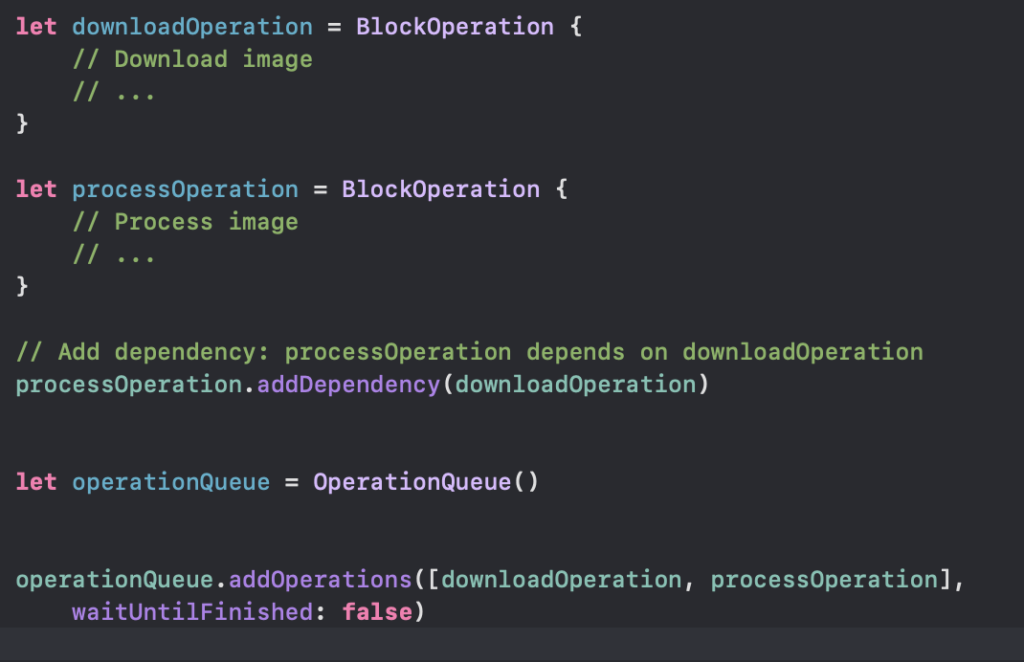
Scenario1:

Imagine you have two tasks: Task A downloads an image from a URL, and Task B processes the downloaded image. Task B should only execute after Task A has completed successfully.

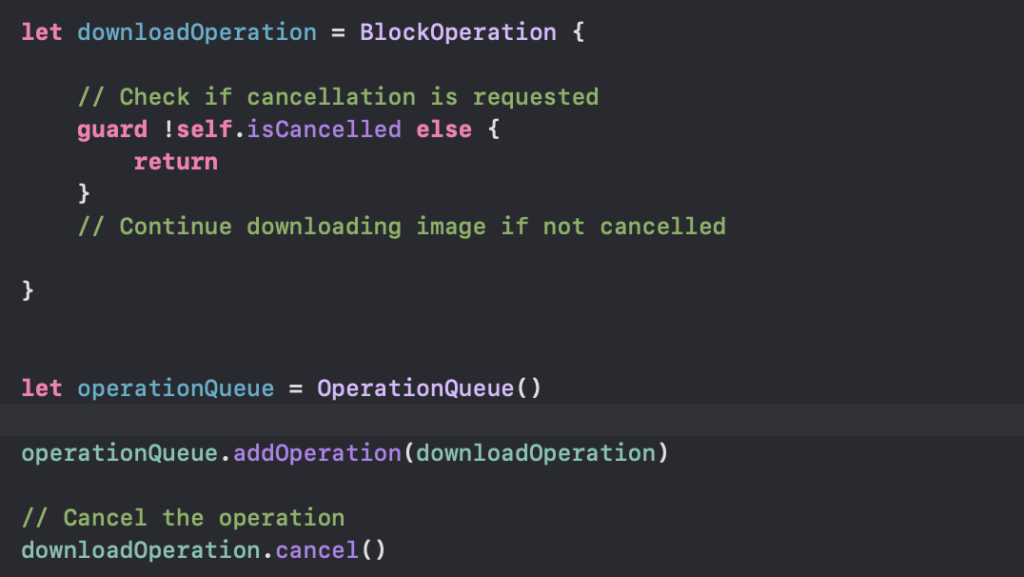
Scenario2:

Suppose the user decides to cancel the image downloading process while it’s in progress.

Explanation:

  • Dependency Creation: By using addDependency( ) method, you establish a dependency relationship between processOperation and downloadOperation. This ensures that processOperation will not start until downloadOperation finishes.
  • Cancellation: By calling the cancel() method on the operation, we can request the operation to cancel its execution. However, it’s important to note that this only sets the isCancelled property of the operation to true. It’s up to the operation to check this property periodically during its execution and abort if cancellation is requested.

Operation Queue offers powerful features for managing dependencies between operations and handling cancellation requests gracefully. These features are particularly useful in scenarios where tasks have complex interdependencies or when the user needs to interact with long-running operations.

GCD vs OperationQueue

GCD:

  • Doesn’t have built-in support for managing dependencies between tasks. We need to manually handle dependencies by using dispatch groups or nesting blocks.
  • Doesn’t have built-in support for cancellation. We need to explicitly check for cancellation within your blocks and return early if needed.

Operation Queue:

  • Offers built-in support for managing dependencies between operations using addDependency(_:) method. This makes it easier to define and manage complex task dependencies.
  • Provides built-in support for cancellation by setting the isCancelled property of operations. Operations can check this property periodically and abort their execution if cancellation is requested.

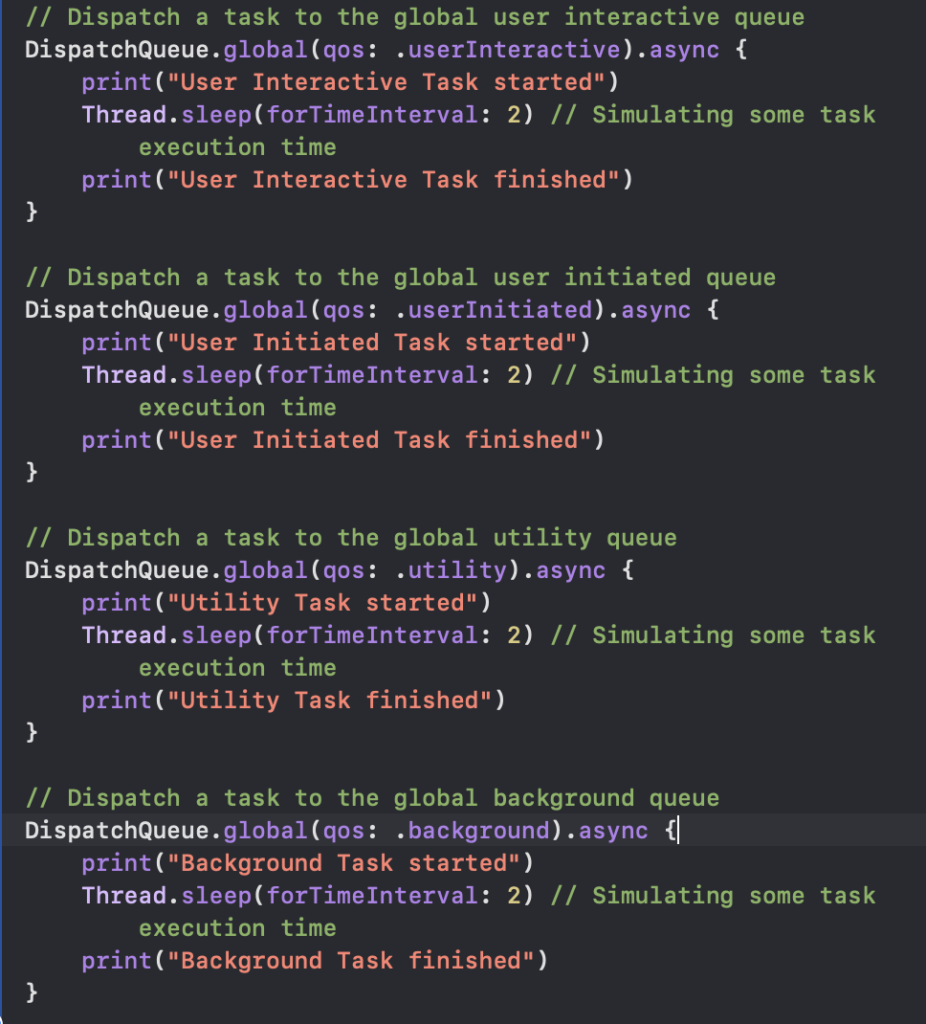
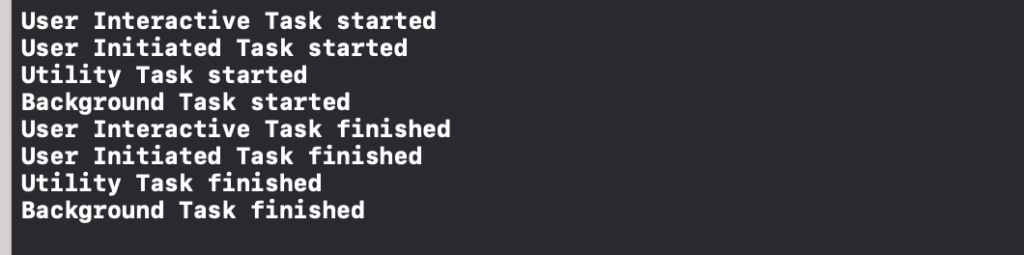
Global Dispatch Queues

GCD provides a set of global dispatch queues that are managed by the system. These queues are categorised into different quality-of-service (QoS) classes, indicating their priority.

  • userInteractive: Highest priority, used for tasks that must be executed immediately to provide a smooth user experience.
  • userInitiated: High priority, used for tasks initiated by the user that require immediate results.
  • default: Default priority, used for tasks that are not time-critical but should be executed reasonably soon.
  • utility: Low priority, used for long-running tasks that are not time-sensitive, such as file I/O or network requests.
  • background: Lowest priority, used for tasks that can run in the background, such as data synchronisation or prefetching.

Main Dispatch Queue:

The Main Dispatch Queue is a special serial dispatch queue associated with the main thread of your application. It’s the primary queue for updating the user interface and handling events like user interactions.

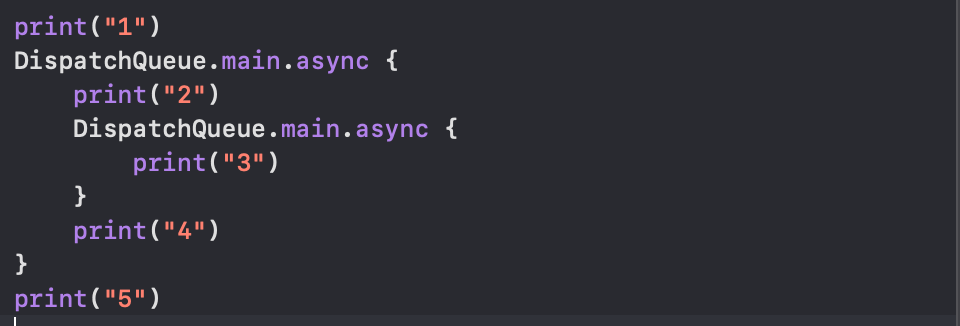
  1. print("1") is executed synchronously, printing “1” immediately.
  2. DispatchQueue.main.async is called to asynchronously execute the closure on the main queue.
  3. print("5") is executed synchronously after the async call, printing “5”.
  4. Inside the async closure:
    • print("2") is executed synchronously, printing “2”.
    • DispatchQueue.main.async is called again to asynchronously execute the inner closure on the main queue.
    • print("4") is executed synchronously after the async call, printing “4”.
  5. Inside the inner async closure:
    • print("3") is executed synchronously, printing “3”.
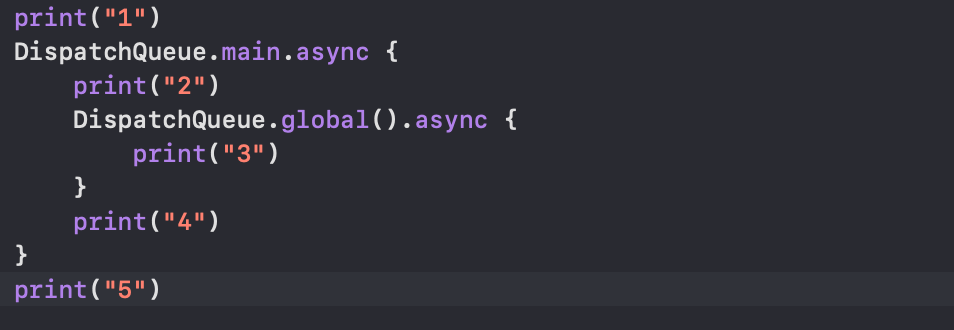
  1. print("1") is executed synchronously, printing “1” immediately.
  2. DispatchQueue.main.async is called to asynchronously execute the closure on the main queue.
  3. print("5") is executed synchronously after the async call, printing “5”.
  4. Inside the async closure:
    • print("2") is executed synchronously, printing “2”.
    • DispatchQueue.global().async is called to asynchronously execute the closure on the global queue.
    • print("4") is executed synchronously after the async call, printing “4”.
  5. print("3") is not guaranteed to be executed before “4” because it’s scheduled asynchronously on the global queue, which may take some time to execute.

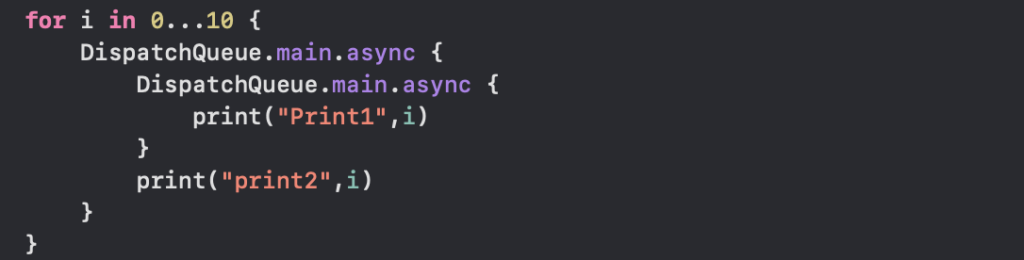
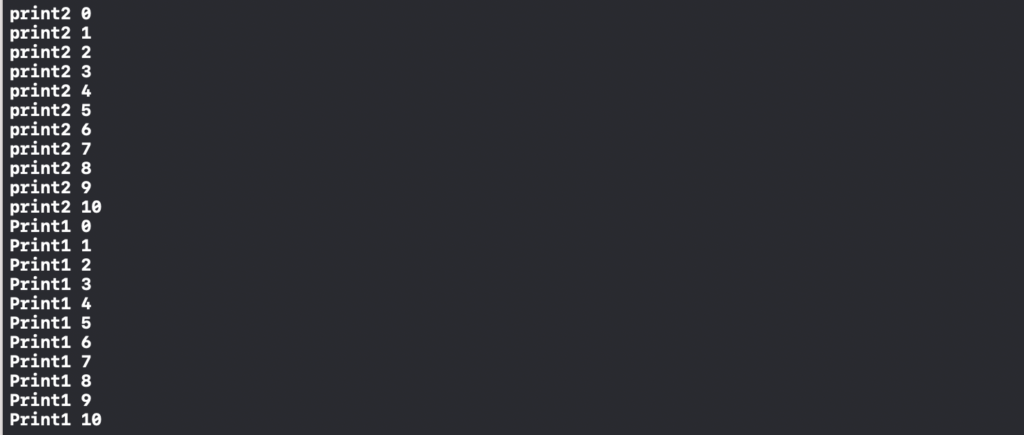
Explaination:

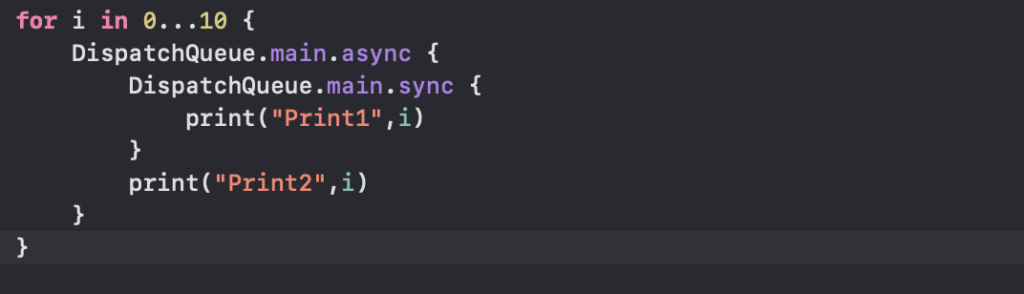
  1. The outer block (print2) will execute first because it’s dispatched before the inner block (Print1).
  2. The inner block (Print1) will execute after the outer block because it’s nested within it.

Dispatch.main is a serial queue which has single thread to execute all the operations. If we call sync on this queue it will block all other operations currently running on the thread and try to execute the code block inside sync whatever you have written. This results in “deadlock” and app will get crash.

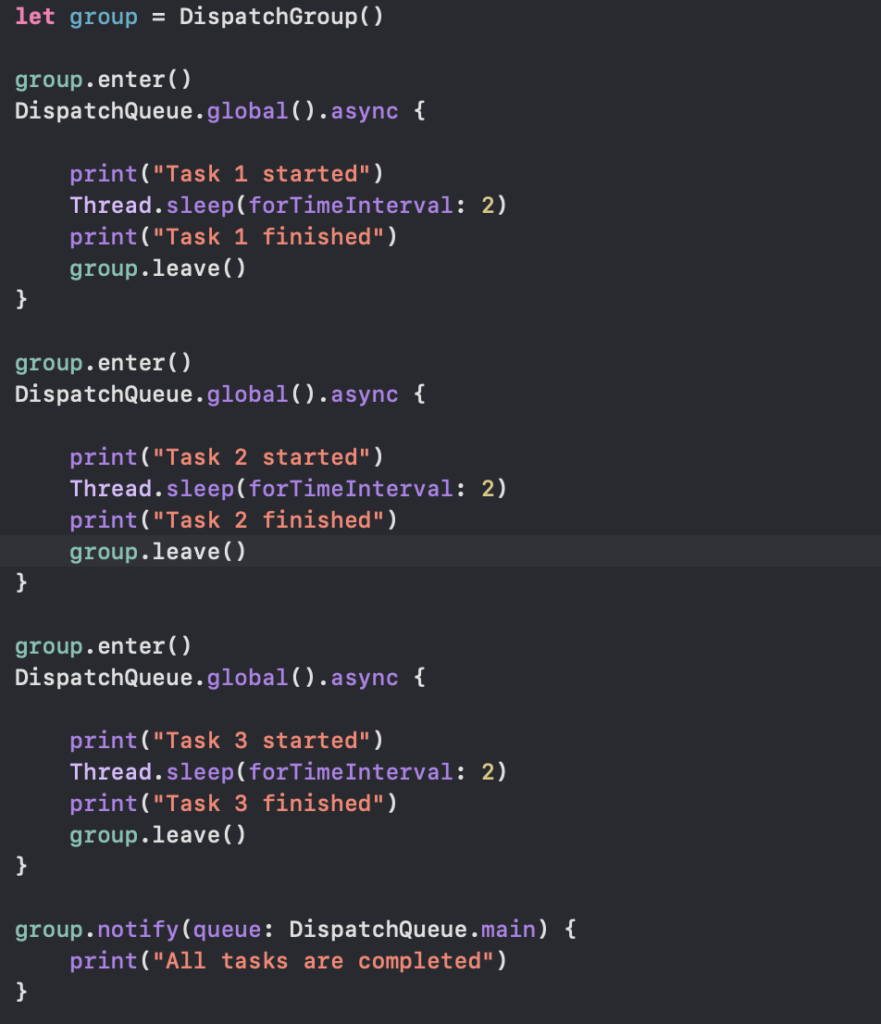
Dispatch Groups

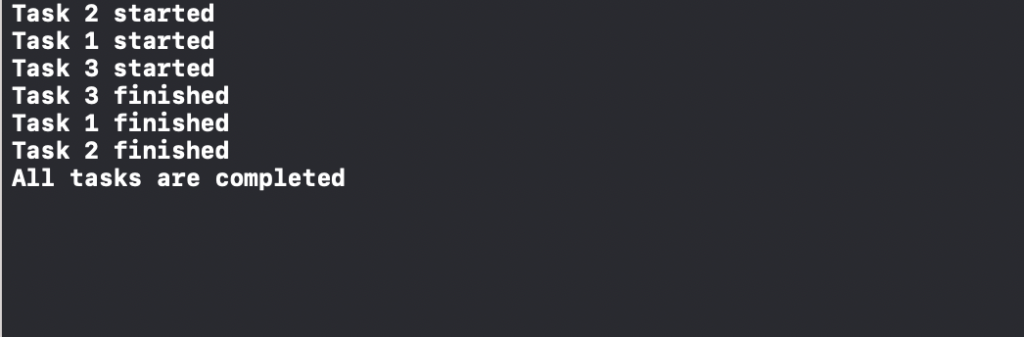
Dispatch groups provide a way to monitor the completion of multiple tasks dispatched asynchronously. They allow you to wait until all tasks in the group have finished executing before continuing with further code.

Grand Central Dispatch (GCD)

Grand Central Dispatch is a low-level API provided by Apple for managing concurrent operations. GCD abstracts away many of the complexities of thread management and provides a simple and efficient way to execute tasks concurrently.

It provides a set of APIs for managing tasks and executing them concurrently on multicore hardware. GCD helps developers to create responsive and scalable applications by offloading time-consuming tasks to background threads, thus keeping the main thread free to handle user interactions.

There are two types of dispatch queues:

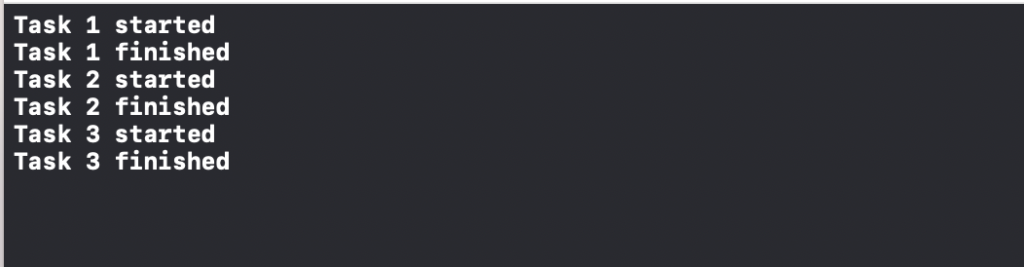
  • Serial Queues: Executes tasks one at a time in the order they are added to the queue. Tasks in a serial queue are guaranteed to run sequentially.
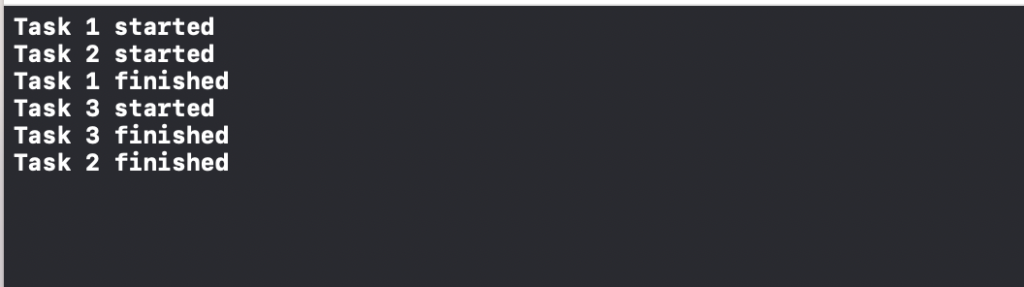
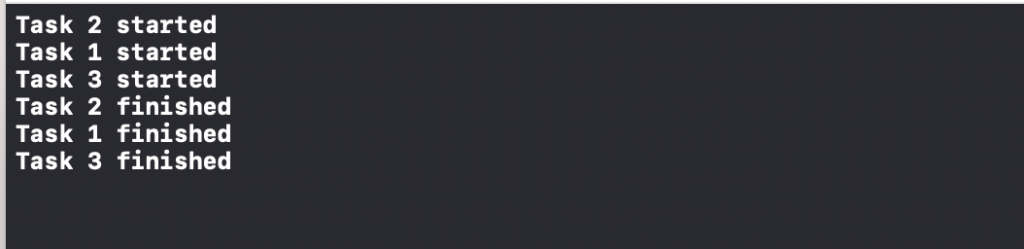
  • Concurrent Queues: Can execute multiple tasks concurrently. Tasks may start and finish in any order.

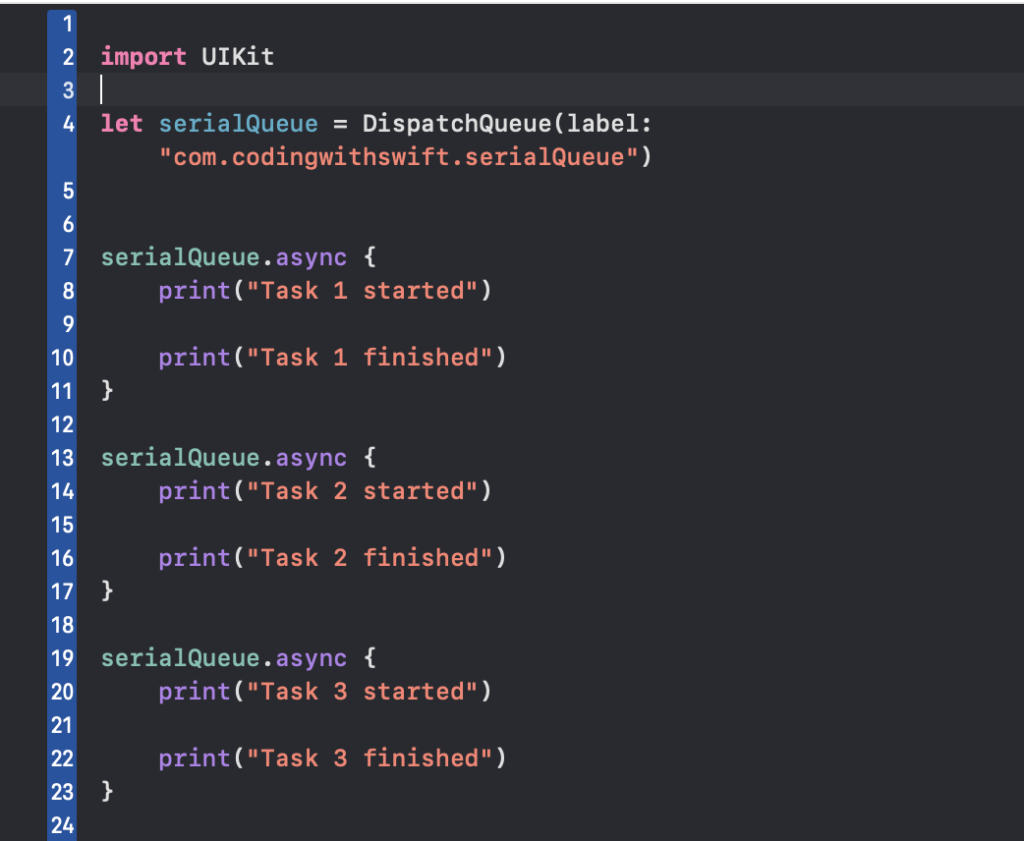
Serial Queues

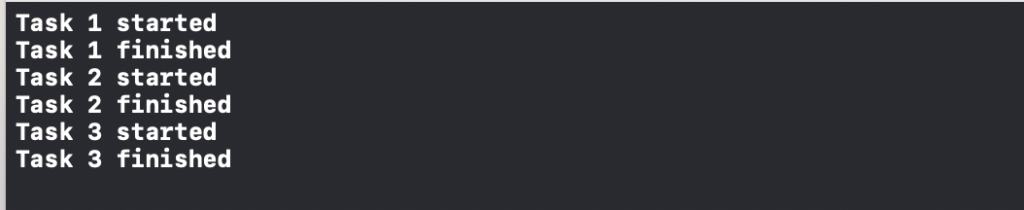
A serial queue is a type of dispatch queue in Grand Central Dispatch (GCD) that executes tasks in a FIFO (first-in, first-out) order. This means that tasks added to the queue are executed one at a time, in the order in which they were added.

Serial queues are useful when you want to ensure that tasks are executed sequentially, avoiding concurrency issues such as race conditions.

Concurrent Queues

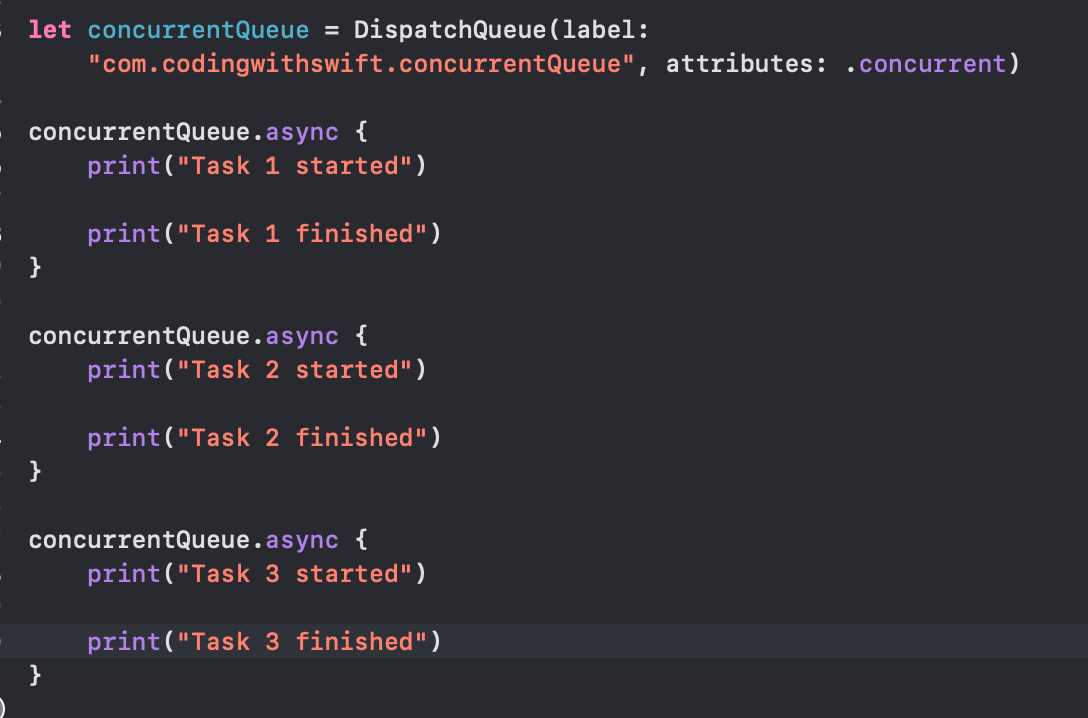
A concurrent queue in Swift allows multiple tasks to be executed concurrently, meaning they can run simultaneously. Unlike serial queues, tasks in a concurrent queue can start and finish in any order.