Array

Array is an ordered, random-access collection type. Arrays are one of the most commonly used data types in an app. We use the Array type to hold elements of a single type, the array’s Element type. An array can store any kind.

Empty arrays

The following three declarations are equivalent:

// A mutable array of Strings, initially empty.

var arrayOfStrings: [String] = [] 

var arrayOfStrings = [String]() 

var arrayOfStrings = Array<String>()

Multi-dimensional arrays

A multidimensional array is created by nesting arrays.

2D Array

let twoDArray = [[Int]] or Array<Array<Int>>

3D Array

let threeDArray: [[[Int]]]

Modifying an Array

  1. Appending Elements
var numbers = [1, 2, 3] 

numbers.append(4) // [1, 2, 3, 4]
  1. Inserting Elements
numbers.insert(0, at: 0) // [0, 1, 2, 3, 4]
  1. Removing Elements
numbers.remove(at: 1) // Removes the second element (1) 
numbers.removeLast() // Removes the last element 
numbers.removeAll() // Empties the array
  1. Updating Elements
numbers[0] = 100 // Changes the first element to 100

Iterating Through an Array

  1. For Loop
for number in numbers { 
print(number) 
}
  1. For Loop with Index
for (index, value) in numbers.enumerated() { 
print("Index \(index): \(value)") 
}
Operators in Swift

Types of Operators

  • Assignment Operator
  • Arithmetic Operators
  • Compound Assignment Operators
  • Comparison Operators
  • Logical Operators
  • Ternary Conditional Operator
  • Range Operators
  • Nil-Coalescing Operator
  • Identity Operators
  • Bitwise Operators

1. Assignment Operator

Assigns the value on the right-hand side to the variable or constant on the left-hand side. (=)

 let x = 18 // Assigns 18 to x
 var y = 8
 y = x // Now y is equal to 18

2. Arithmetic Operators

Swift provides standard arithmetic operators for mathematical operations:

  • + (Addition): a + b
  • - (Subtraction): a - b
  • * (Multiplication): a * b
  • / (Division): a / b
  • % (Modulo): a % b (remainder of a divided by b)
let a = 15
let b = 4
print(a + b)  // Output: 19 (Addition)
print(a - b)  // Output: 11 (Subtraction)
print(a * b)  // Output: 60 (Multiplication)
print(a / b)  // Output: 3 (Division)
print(a % b)  // Output: 3 (Modulo)

3. Compound Assignment Operators

These combine an operation with assignment, allowing you to update a variable by performing an operation on it:

  • +=: a += b (Equivalent to a = a + b)
  • -=: a -= b
  • *=: a *= b
  • /=: a /= b
  • %=: a %= b
var x = 10
x += 5       // Equivalent to `x = x + 5`
print(x)     // Output: 15

x -= 3       // Equivalent to `x = x - 3`
print(x)     // Output: 12

x *= 2       // Equivalent to `x = x * 2`
print(x)     // Output: 24

x /= 4       // Equivalent to `x = x / 4`
print(x)     // Output: 6

x %= 5       // Equivalent to `x = x % 5`
print(x)     // Output: 1

Variables & Properties

Creating a Variable

Declare a new variable with var, followed by a name, type, and value:

var num: Int = 10

Variables can have their values changed:

num = 20 // num now equals 20

Unless they’re defined with let:

let num: Int = 10 // num cannot change

Property Observers

Property observers respond to changes to a property’s value.

var myProperty = 5 {

 willSet {

     print(“Will set to \(newValue). It was previously \(myProperty)”)

}

  didSet {

        print(“Did set to \(myProperty). It was previously \(oldValue)”)

} } 

myProperty = 6

// prints: Will set to 6, It was previously 5

willSet is called before myProperty is set. The new value is available as newValue, and the old value is still available as myProperty. 

didSet is called after myProperty is set. The old value is available as oldValue, and the new value is now available as myProperty . 

Lazy Stored Properties

Lazy stored properties have values that are not calculated until first accessed. This is useful for memory saving when the variable’s calculation is computationally expensive. 

lazy var lazyProperty: Int = {

        print(“Initializing lazy property”)

        return 42

}()

  • Lazy stored properties must be declared with var.
  • Lazy properties are particularly useful for optimizing performance by deferring the initialization of properties until they are actually needed

Computed Properties

Different from stored properties, computed properties are built with a getter and a setter, performing necessary code when accessed and set. Computed properties must define a type: 

var radius = 0.0

var circumference: Double {

return 2 * Double.pi * radius

}

Type Properties

Type properties are properties on the type itself, not on the instance. They can be both stored or computed properties. Declare a type property with static: 

struct Subject {

static var name = “Code with swift !”

}

print(Subject.name) // Prints “Code with swift !”

In a class, we can use the class keyword instead of static to make it overridable. However, we can only apply this on computed properties:

class Animal {

class var animal: String {

return “Animal”

}

}

class Dog: Animal {

override class var animal: String {

return “Dog”

}

}


Data Types

There are six basic types of data types in Swift programming.

  • Character
  • String
  • Integer
  • Float
  • Double
  • Boolean

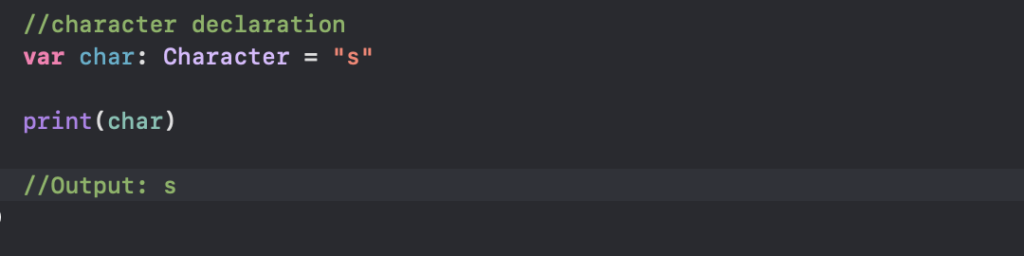
Character

The character data type is used to represent a single-character string. We use the Character keyword to create character-type variables. For example

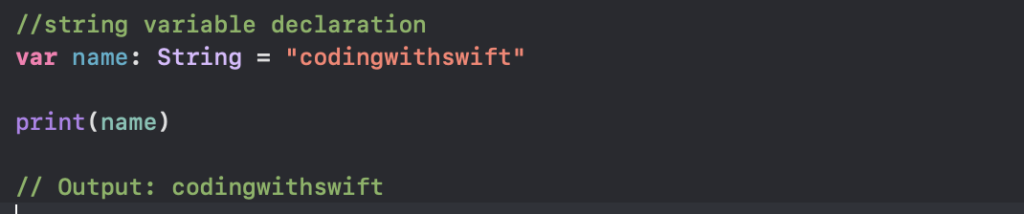
String

The string data type is used to represent textual data. We use the String keyword to create string-type variables.

String Interpolation

It allows injecting an expression directly into a string literal. This can be done with all types of values, including strings, integers, floating point numbers and more.

The syntax is a backslash followed by parentheses wrapping the value: \\(value). Any valid expression may appear in the parentheses, including function calls.

let number = 5

let interpolatedNumber = “\\(number)” // string is “5”

let fortyTwo = “\\(6 * 7)” // string is “42”

Concatenate strings

Concatenate strings with the + operator to produce a new string:

let name = “John”

let surname = “Appleseed”

let fullName = name + ” ” + surname // fullName is “John Appleseed”

Reversing Strings

let aString = “This is a test string.”

let reversedCharacters = aString.characters.reversed()

let reversedString = String(reversedCharacters)

Integer

Integer refers to a category of data types representing whole numbers. It’s a protocol that defines common behavior for integer types. Swift provides several built-in integer types, such as Int, Int8, Int16, Int32, Int64, UInt, UInt8, UInt16, UInt32, and UInt64

var integerNumber: Int = 10

var unsignedIntegerNumber: UInt = 20

Swift vs Objective C

  1. Syntax:
    • Swift: Swift has a more modern and concise syntax compared to Objective-C. It’s influenced by languages like Python and Ruby and is designed to be easier to read and write.
    • Objective-C: Objective-C has a more verbose syntax with the extensive use of square brackets for method calls. It’s influenced by C and Smalltalk.
  2. Memory Management:
    • Swift: Uses Automatic Reference Counting (ARC) for memory management, where memory is automatically managed by the compiler. Developers rarely need to deal with manual memory management.
    • Objective-C: Uses manual memory management with reference counting and retains/releases. Developers need to manage memory manually by adding and removing object ownership.
  3. Safety:
    • Swift: Designed with safety in mind, providing features like optionals, type inference, and type safety, which help prevent common programming errors like null pointer dereferences and type mismatches.
    • Objective-C: Lacks some of the safety features present in Swift. Developers need to be more cautious with memory management and handling nil values.
  4. Interoperability:
    • Swift: Fully interoperable with Objective-C. Developers can use Swift and Objective-C code in the same project seamlessly, allowing gradual migration from Objective-C to Swift.
    • Objective-C: Can call Swift code and vice versa. Objective-C code can directly call Swift code by importing the Swift header into Objective-C files.
  5. Performance:
    • Swift: Generally considered to be faster than Objective-C due to its modern design, optimizations, and better memory management.
    • Objective-C: Slightly slower than Swift due to its dynamic nature and the overhead of message passing.
  6. Community and Ecosystem:
    • Swift: Growing rapidly with a large and active community. Continuously evolving with regular updates and improvements from Apple.
    • Objective-C: Mature language with an extensive library and a vast amount of existing code. However, its growth has slowed down in favor of Swift.

Getting Started with Swift Programming

Swift is a powerful and intuitive programming language developed by Apple Inc. It was introduced in 2014 as a replacement for Objective-C to develop applications for iOS, macOS, watchOS, and tvOS platforms. Swift is designed to be modern, safe, fast, and developer-friendly.

Key Features of Swift:

  1. Safety: Swift is built with safety in mind. It reduces the chances of errors and crashes by enforcing strict typing, eliminating common programming mistakes, and providing features like optionals to handle nil values safely.
  2. Speed: Swift is designed to be fast. It’s built using LLVM compiler framework, optimized for performance, and employs advanced techniques like generics and high-performance data structures to ensure speedy execution.
  3. Expressive Syntax: Swift features a concise and expressive syntax that is easy to read and write. It incorporates modern language features like closures, tuples, and pattern matching, enabling developers to write clean and efficient code.
  4. Interoperability: Swift is fully interoperable with Objective-C. This means you can use Swift code alongside existing Objective-C libraries and frameworks, making it easier to adopt Swift in projects with legacy codebases.
  5. Automatic Memory Management: Swift uses Automatic Reference Counting (ARC) to manage memory automatically. This helps in preventing memory leaks and ensures efficient memory usage without the need for manual memory management.
  6. Functional Programming Support: Swift supports functional programming paradigms by providing first-class functions, closures, and immutable data structures. This allows developers to write code in a more declarative and concise manner.
  7. Protocol-Oriented Programming: Swift promotes Protocol-Oriented Programming (POP) as a key paradigm for code design. POP encourages the use of protocols to define interfaces and behavior, facilitating code reuse, modularity, and flexibility. By leveraging protocol extensions, Swift developers can provide default implementations, promote composability, and enhance testability.
  8. Value Semantics: Value types promote value semantics, meaning that instances are copied when passed around or assigned to new variables. This ensures that changes to one instance don’t affect other instances, leading to more predictable and maintainable code.

To start programming in Swift, you’ll need:

  • Xcode: Apple’s integrated development environment (IDE) for macOS, which includes Swift compiler and other tools necessary for iOS/macOS development.
  • Swift Playgrounds: An interactive environment for learning and experimenting with Swift code, available on iPad and Mac.